
Windows 64-bit
For most modern Windows PCs
Opens the official pje.jus.br download source
People searching for PJeOffice TRF3 usually need the common PJeOffice Pro installer, the official TRF3 entry point, and a safe way to separate computer, certificate, and court-service failures.
Choose the official PJeOffice Pro fileThe court, PJeOffice Pro, and the digital certificate are separate layers of the signing flow.
The first-party sources checked for this guide did not show a separate TRF3-branded PJeOffice Pro binary. Choose the file by operating system and architecture; account access, court notices, and court support remain separate.
This is an independent site. It is not affiliated with CNJ, TRF3, or any Brazilian court. Follow the current official instruction when it differs from this summary.
The query combines download, setup, and court access, but it does not require a renamed TRF3 installer.
For TRF3 PJe work, download PJeOffice Pro from the first-party distribution, choose Windows, macOS, or Linux, and match the computer architecture. Then open the official TRF3 entry separately and test the browser, local signer, and certificate as different components.
PJeOffice TRF3 can appear with download, installation, or certificate terms. Those variants belong in one guide because the key decision is the same: choose the correct file and identify the failed layer before reinstalling.
A search for an older 1.0.26 reference should not lead to an old mirror. A phrase such as 1.0.26 or higher usually describes a minimum requirement; use the current download matrix for available files.
These six cards use the verified first-party destinations. Choose by system and processor, not by the court acronym.
For most modern Windows PCs
Opens the official pje.jus.br download source
For older 32-bit Windows systems
Opens the official pje.jus.br download source
For M1, M2, M3, M4, and later chips
Opens the official pje.jus.br download source
For Mac computers with an Intel processor
Opens the official pje.jus.br download source
For most current Linux distributions
Opens the official pje.jus.br download source
For legacy 32-bit Linux systems
Opens the official pje.jus.br download source
A court page can request a signature without being PJeOffice itself. The browser starts the request; the local program communicates with the certificate.
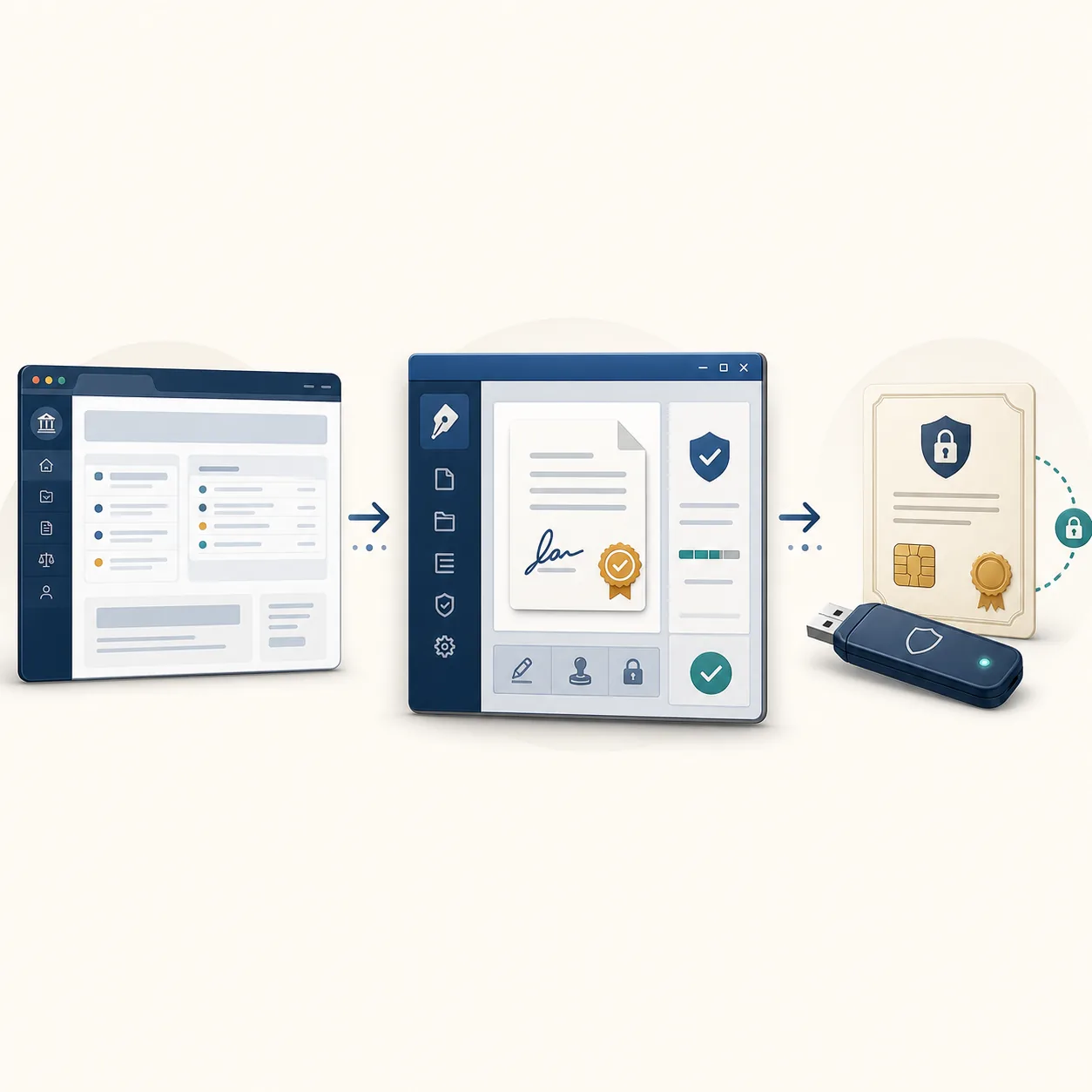
Use this boundary to find the first failure. If the portal does not open, check the TRF3 address and official notices. If the portal opens but the request never reaches PJeOffice, confirm that the application is running and that the local connection is allowed. If the application opens without a certificate, check the driver, middleware, validity, and A1/A3 source.
The illustration is explanatory only. Reinstalling a local application cannot repair a remote court outage.
Identifying the owner avoids an unnecessary download or sending sensitive material to the wrong support channel.
Use a short, reversible sequence without disabling antivirus protection or Gatekeeper.
Identify Windows or Linux 32/64-bit, or Mac Intel/Apple Silicon. Keep the original downloaded filename.
Keep one PJeOffice instance open and do not mix an older signer with Pro during the first test.
Select the A1 file, or confirm the A3 driver, middleware, reader, or token before changing PJeOffice settings.
Open the official portal, start an allowed test action, and confirm that the request reaches the signer. Do not test with a confidential filing.
The configuration screen helps separate a certificate problem from a TRF3 access problem.
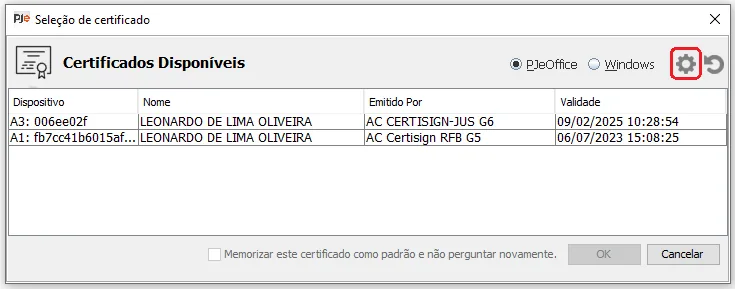
After opening PJeOffice, refresh the list and confirm the holder, validity, and selected source. An A1 depends on the file and password; an A3 also depends on the device and vendor library.
If the certificate is missing, check the driver, middleware, USB connection, validity, and architecture first. Never send the file, private key, password, or PIN to support.
A token can be connected and still unavailable to PJeOffice when the driver or PKCS#11 library is wrong.
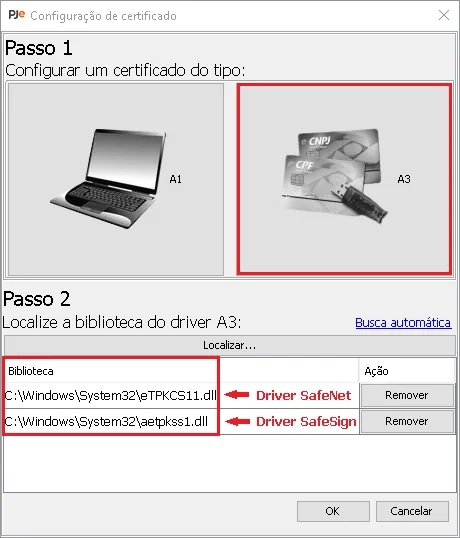
When the device is missing, confirm that the vendor software recognizes it, the correct library is selected, and the driver architecture matches the system. Repeat the PJeOffice test only after that layer is working.
If the certificate is visible but the court page fails, stop changing drivers and examine the browser, request permission, account, and TRF3 service status.
Use the first observable symptom to choose the next check.
| Signal | Next check | Likely owner |
|---|---|---|
| The application will not open | Version, architecture, older instance, and local permission | Computer or PJeOffice |
| The certificate is missing | Driver, middleware, validity, and A1/A3 source | Issuer, device, or local setup |
| The browser cannot find the signer | Application state, local connection, and request permission | PJeOffice, browser, or device policy |
| TRF3 is unavailable for several users | Official notices and court support channels | Judicial service |
| The account or case is rejected | Profile, authentication, and court instructions | TRF3 or the user's organization |
Version freshness is separate from court access.
All six stable destinations on pje-office.pje.jus.br returned HTTP 200 without redirecting to an unknown domain: Windows 32/64-bit, macOS Intel/Apple Silicon, and Linux 32/64-bit. Card sizes come from server headers and are not a security or release-date claim.
No reliable public release date was found. The July 23, 2024 Last-Modified header is treated only as a server file timestamp. Recheck version, filename, size, and compatibility when the official source changes.
Use these sources for version, access, and instructions that may change.
Choose the official file, verify the local certificate, and only then investigate the court portal.
The practical sequence is simple: select PJeOffice Pro by platform, keep the version and filename, open TRF3 through its official source, and perform a safe test. If the certificate is visible but the judicial service remains unavailable, contact the court instead of repeating installation.
This boundary makes PJeOffice TRF3 useful without claiming that a local download can repair an account, case, deadline, remote outage, or court policy.
Short answers for download, installation, certificates, and court access.
Use one of the six official PJeOffice Pro files that matches the system and architecture. Open the TRF3 portal separately through the court's official source.
No separate TRF3-branded binary was verified in the checked first-party sources. The common PJeOffice Pro 2.5.16u files are selected by platform.
Use Windows 64-bit for most current PCs and 32-bit only for legacy systems. On Mac, choose Apple Silicon for M-series chips and Intel for Intel Macs.
Confirm that the signer is running, the certificate is visible, and the local connection works. If several users are affected, check official court notices before reinstalling.
No. Keep the file, private key, password, and PIN private; share only platform, version, error text, and non-sensitive test details.