
Windows 64-bit
For most modern Windows PCs
Opens the official pje.jus.br download source
Use this independent PJe Office download guide to get PJeOffice Pro for Windows, macOS, or Linux from the official PJe distribution server. Choose your operating system and processor below, then follow the focused installation and certificate setup guides.
This is an independent download guide. We are not affiliated with CNJ, TRF3, PJe, or any Brazilian court.
Version 2.5.16u
This independent PJe Office download guide helps you choose the file that matches your computer. Every button points to the official PJe file server and never to a repackaged mirror.
For most modern Windows PCs
Opens the official pje.jus.br download source
For older 32-bit Windows systems
Opens the official pje.jus.br download source
For M1, M2, M3, M4, and later chips
Opens the official pje.jus.br download source
For Mac computers with an Intel processor
Opens the official pje.jus.br download source
For most current Linux distributions
Opens the official pje.jus.br download source
For legacy 32-bit Linux systems
Opens the official pje.jus.br download source
A 15-second confirmation appears before leaving this site. It shows the exact filename and gives you time to confirm the selected operating system and architecture.
These facts were checked against the PJeOffice Pro user guide and the official file server on July 16, 2026.
The exact screens differ by operating system, but the basic path is the same.
Most Windows computers use the 64-bit EXE. On a Mac, check whether the processor is Apple Silicon or Intel before downloading the DMG.
Open the downloaded file from your browser or Downloads folder. Approve the operating-system prompt only after confirming that the filename matches the selection shown above.
Start PJeOffice Pro, choose the appropriate A1 or A3 certificate source, and confirm that the certificate appears before opening your court's PJe portal. See the complete installation guide for system-specific steps.
Use the system page when you need help choosing an architecture, opening the installer, or resolving an operating-system warning.
Choose between 64-bit and 32-bit builds, verify your system type, and learn when administrator access is useful.
Windows download guideMatch the DMG to an Intel or Apple Silicon Mac, including M1, M2, M3, M4, and later chips.
Mac download guideDownload the 64-bit or legacy 32-bit ZIP and follow the distribution-neutral setup checklist.
Linux download guidePJeOffice Pro is the updated edition of the desktop signer used with Brazil's Processo Judicial Eletrônico environment.
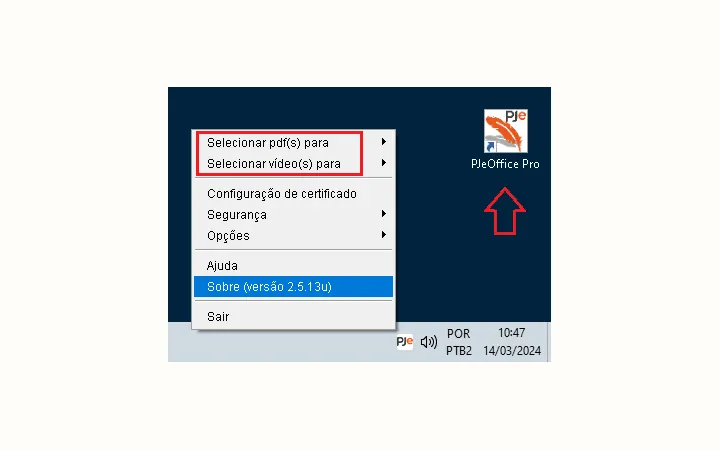
The application keeps the original PJeOffice role of connecting the browser-based judicial system to a local digital certificate. The Pro edition also adds local tools for signing, splitting, and merging PDF files, along with video splitting, optimization, audio extraction, and MP4-to-WebM conversion.
Those file operations run on the user's computer. That is useful for judicial material because a document or video does not have to be uploaded to an unrelated online converter. The official guide identifies the orange feather icon and the added PDF/video tools as visible differences between the Pro edition and the older PJeOffice application.
References to version 1.0.26 usually come from older court instructions or minimum-version notices. Do not install an obsolete build merely to match an old document. Use the currently listed official version unless your court's current support team provides a specific reason not to.
The current Pro installer already contains the tested Java runtime it needs.
The official troubleshooting guidance says that PJeOffice Pro uses its own embedded Java. Installing or updating the system-wide Java runtime does not replace the embedded runtime and normally will not fix a token or certificate recognition problem.
If the certificate is missing, check the token driver, Windows certificate store option, PKCS#11 library, USB connection, and 32/64-bit compatibility instead.
Searches often include a court acronym, but many courts use the same CNJ/TRF3 PJeOffice Pro installer. Court pages should clarify portal links and local requirements instead of inventing a separate edition.
Start with the directory to understand the difference between the common installer and each court's own PJe access page.
Browse courtsFind the current PJeOffice download path and official Tribunal de Justiça do Rio de Janeiro access resources.
PJeOffice for TJRJChoose Windows or macOS, including Apple Silicon, and open the official TJDFT PJe support resources.
PJeOffice for TJDFTDownloading the latest installer is only one part of the workflow. Use the focused guides below when the app is installed but PJe still cannot use it.
Check whether PJeOffice is running, restart the local service, confirm the browser request, and reinstall only after the faster checks fail.
Fix unavailable errorsWork through A1/A3 selection, token drivers, PKCS#11 libraries, architecture matching, and Windows certificate integration.
Fix certificate detectionClose the older signer, confirm which edition is installed, and move to the currently listed Pro build without keeping conflicting instances open.
Update PJeOfficeThis independent PJe Office download guide ties its version, platform, and troubleshooting claims to first-party judicial sources.
Answers to the most common version, platform, and installation questions.
Use one of the platform buttons on this page for a PJe Office download from the official distribution host at pje-office.pje.jus.br. A 15-second confirmation identifies the selected file before you leave this guide.
The official guide listed version 2.5.16u when checked on July 16, 2026. Always confirm the version and filename shown on this site before opening the installer.
Yes. The official guide describes PJeOffice as software made available free of charge by CNJ for PJe access, digital certificates, and electronic document signing.
Use 64-bit on most current Windows computers. Choose 32-bit only if Windows System type explicitly says that you have a 32-bit operating system or a support technician has confirmed that requirement.
Choose the Apple Silicon or ARM64 DMG. The Intel x64 DMG is for older Intel-based Mac computers.
No iOS installer is listed in the official PJeOffice Pro download table. The supported desktop downloads are Windows, macOS, and Linux.
No. The official guide says PJeOffice Pro includes its own tested Java runtime. A separate system Java update normally does not fix PJeOffice certificate or token errors.
Not necessarily. Many court pages point users to the common PJeOffice Pro distribution. What changes more often is the court portal, browser flow, support channel, or local setup guidance.