
Legal professionals
Lawyers, public defenders, prosecutors, and other representatives use certificates to access cases and sign filings.
PJeOffice Pro is a free desktop signer for supported PJe certificate and signing flows. This page explains its local role, PDF/video tools, and how to identify the current 2.5.16u download.
Download PJeOffice ProIt is a local certificate and signing application with additional document-processing functions.
The web portal and the desktop app have different responsibilities. The portal manages the judicial service, account context, cases, and filing flow. PJeOffice Pro runs locally and interacts with the selected digital certificate when a supported portal requests authentication or a signature. This separation explains why reinstalling the desktop app cannot repair a remote portal outage or an account permission problem.
The Pro name can also be misleading to users who expect a paid upgrade. The official documentation describes the application as free and presents Pro as the expanded edition. Its local PDF and video functions are particularly relevant when files contain confidential or unusually large judicial material that should not be uploaded to an unrelated web converter.
PJeOffice Pro is still part of a larger trust chain: the certificate authority issues the credential, device middleware exposes an A3 token, the operating system runs the application, the browser starts the request, and the court service validates the transaction. A problem at any link can appear during the same login or signing flow.
The application creates a controlled local bridge between the web-based PJe environment and a certificate available on the user's computer or hardware device.
PJeOffice Pro is commonly involved when a lawyer, court employee, public defender, prosecutor, expert, interpreter, or other authorized participant authenticates to PJe or signs an electronic document. The browser portal initiates a request, the local application accesses the selected certificate, and the user confirms the protected operation.
The desktop signer is not the court portal itself. Installing PJeOffice does not create a PJe account, grant case access, or replace court-specific registration. It supplies the local certificate and signing component required by supported portal flows.
The official guide explains that the 2023 Pro update retained the original access and signing functions while improving usability, efficiency, stability, and security. It also brought common document and video operations into the same local application.
These functions run on the workstation rather than requiring an unrelated online converter.
| Area | Functions | Practical use |
|---|---|---|
| Digital certificates | A1 files, A3 tokens/smart cards, Windows certificate integration, PKCS#11 | Authenticate and sign through supported PJe flows |
| PDF files | Sign, split by size or pages, remove pages, merge documents | Prepare filings within portal size and document requirements |
| MP4 video | Split by size/time/cuts, optimize, extract audio, convert to WebM | Prepare large hearing or evidence files locally |
| Security | Password request strategies, device confirmation, authentication cycles | Balance repeated signing productivity with workstation risk |
| Updates | Embedded Java and application update mechanism | Keep the required runtime aligned with the supported application build |
The name Pro indicates the updated feature set, not a paid subscription.
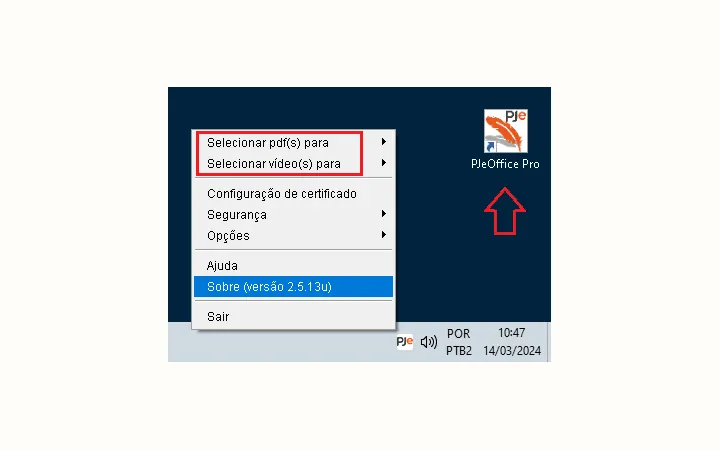
The Pro edition is still free. In this context, Pro refers to expanded office functions and improved certificate behavior rather than a commercial tier. The official guide identifies PDF/video tools and the newer icon as visible differences.
Users following older court documents may see the legacy name or a minimum version such as 1.0.26. Those references should be interpreted with the current court instructions and official download table; they are not a reason to seek an unofficial old installer.
The application can invoke a private key that represents the certificate holder.
Always requesting the password is the most conservative choice. Requesting it once can reduce repeated input but should not be used on a shared or unattended workstation. Device-confirmation behavior provides an intermediate workflow.
Lock the computer when leaving it, remove external devices when appropriate, and never share the certificate password with a website or support contact.
The official guide describes both internal judicial users and external professionals.
Lawyers, public defenders, prosecutors, and other representatives use certificates to access cases and sign filings.
Judges, court members, and staff use supported certificate workflows within their institutional environment.
Experts, translators, interpreters, and similar participants may use PJeOffice for their permitted PJe tasks.
Verify features and current files through first-party documentation.
PJeOffice Pro is a local desktop application, while a court's PJe portal remains a separate web service.
PJeOffice Pro runs on the user's computer and provides the local bridge needed for supported digital-certificate operations. It can also perform the documented PDF and video tasks without sending those files to an unrelated online converter. Those capabilities do not turn PJeOffice Pro into a court portal, user account, certificate issuer, or replacement for device middleware.
A complete workflow therefore has several independent parts: the PJeOffice Pro application, a valid A1 or A3 certificate, any required token driver, the browser connection, and the selected court service. Knowing those boundaries makes troubleshooting safer. If the application opens but a token is missing, focus on certificate configuration. If the certificate appears but one court cannot be reached, check that portal and its support channel. Reinstalling PJeOffice Pro is useful only when evidence points to a damaged or obsolete application installation.
Clarifying the product, price, and role.
No. The official guide says PJeOffice is made available free of charge by CNJ. Pro is the name of the updated edition, not a paid plan.
No. PJeOffice Pro is a local desktop application used by supported PJe portal flows for certificate access and signing.
It can perform defined local operations such as signing, splitting, page removal, and merging. It is not presented as a general-purpose PDF editor.
The official guide emphasizes that its PDF and video operations run locally on the user's machine, avoiding the upload required by unrelated online tools.
The guide says the solution is developed within CNJ by a working group coordinated by TRF3.
Use the site's existing PJeOffice Pro download matrix to choose Windows, macOS, or Linux. The current official filenames use version 2.5.16u; keep the original name and source host.