Windows 64-bit
For most modern Windows PCs
Opens the official pje.jus.br download source
Use this PJeOffice TRT15 download guide to choose the common official PJeOffice Pro file, open the current TRT15 website, configure a certificate, and identify whether a failure belongs to your computer or the court service.
Open official TRT15 websiteThe PJeOffice file, the court portal, the certificate, and the user account are separate parts of the workflow.
This page helps with the PJeOffice TRT15 download decision and the first access checks. It does not create an account, change a court permission, recover a certificate PIN, or confirm that a filing was accepted. For a deadline, case, or account issue, use the current TRT15 support route shown on the official court website.
TRT15 is the court context; it is not proof that a separate TRT15-branded installer exists.
For a PJeOffice TRT15 download, begin with the official PJeOffice Pro distribution and choose the file for your operating system and processor architecture. Keep the original filename and the first-party destination. The court acronym in a search query usually tells you where you intend to work, not which binary you should rename or download from an unknown mirror.
After the local application is installed, open the official TRT15 website at trt15.jus.br and follow its current navigation to PJe. The deep portal address, browser instructions, notices, and support contacts can change independently of the PJeOffice version. Because a deep TRT15 page was not reliably accessible during this check, this guide deliberately uses the official root as the safe entry-point fallback instead of inventing a login URL.
Test the workflow in order: the app opens, the certificate appears, the browser can reach the local signer, the TRT15 portal sends a request, and the certificate identity is the one you expect. If the first four checks pass but a court service is unavailable for several users, reinstalling the desktop app is unlikely to repair a remote outage.
Use the verified PJeOffice Pro 2.5.16u files and select by platform, not by court acronym.
The official PJeOffice Pro user guide currently presents version 2.5.16 in its product table, while the user-facing filenames use the 2.5.16u suffix. The six stable first-party file URLs were checked on August 11, 2026. Their range responses, MIME types, extensions, and recorded sizes match the Windows EXE, macOS DMG, and Linux ZIP choices shown below. No newer verifiable release was found, so the existing site-wide version fields remain aligned and this page does not claim a newer TRT15 edition.
Choose Windows 64-bit for most current PCs, Windows 32-bit only for a genuinely 32-bit installation, Apple Silicon for M-series Macs, and Intel for older Intel Macs. On Linux, match the ZIP to the system architecture and follow the distribution-specific permissions described in the Linux guide. A token driver can have its own architecture requirement, so do not use the operating-system label as the only certificate diagnosis.
A court document may mention an older minimum version or a legacy signer. Treat a phrase such as 1.0.26 or higher as a floor unless the first-party notice explicitly requires an exact build. Do not downgrade a working current Pro installation simply because an old tutorial still appears in search results. Record the filename and check date if you need to contact TRT15, a certificate provider, or local IT.
These six buttons lead to verified first-party files. The court does not determine the operating-system package.
For most modern Windows PCs
Opens the official pje.jus.br download source
For older 32-bit Windows systems
Opens the official pje.jus.br download source
For M1, M2, M3, M4, and later chips
Opens the official pje.jus.br download source
For Mac computers with an Intel processor
Opens the official pje.jus.br download source
For most current Linux distributions
Opens the official pje.jus.br download source
For legacy 32-bit Linux systems
Opens the official pje.jus.br download source
A useful PJeOffice TRT15 download page explains what each destination can and cannot fix.
pje-office.pje.jus.br.trt15.jus.br; use its current links to reach PJe.Complete one layer at a time so a portal problem is not mistaken for a download problem.
Read the Windows System type, macOS Chip or Processor value, or Linux architecture before selecting a file. If you use a token, check its vendor driver requirements separately.
Use the grid above or the official PJeOffice guide. Keep the 2.5.16u filename, and do not use a renamed TRT15 package from an unverified mirror.
Close an older signer before launching Pro. Keep one intended PJeOffice instance available while testing so the browser does not connect to an unexpected local process.
For A1, confirm the file and password are available under your policy. For A3, confirm the token or card reader and its vendor middleware are recognized before changing a PKCS#11 path.
Open the official TRT15 website and follow its current PJe path. Avoid relying on an old deep link when the court has moved a portal or notice.
When the portal asks PJeOffice to use a certificate, verify the site context and certificate holder before approving. Test a non-critical step before a real filing or signature.
The official configuration view is useful for distinguishing a missing certificate from a court access failure.
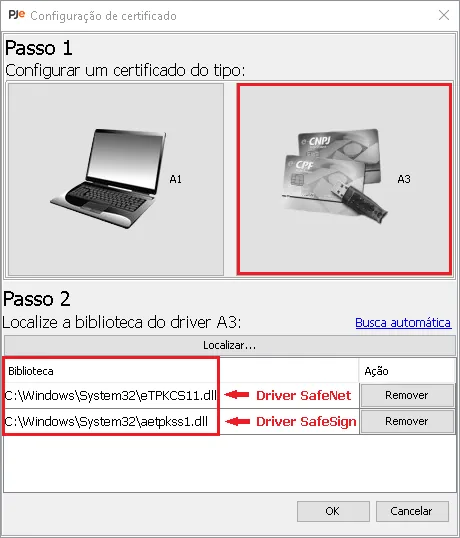
First identify the certificate type. An A1 certificate is normally a file managed under the organization's security policy; an A3 certificate normally depends on a token, smart card, reader, or vendor middleware. The image shows the kind of local driver and certificate choices that must be understood before troubleshooting the TRT15 portal.
If PJeOffice cannot see the certificate, check validity, vendor software, device connection, PKCS#11 library, and 32-bit or 64-bit compatibility. Use the certificate troubleshooting guide for a fuller decision path. Never upload a private key or send a token PIN to a support contact.
The stage that fails usually tells you which owner should receive the next support request.
| Observed result | Likely owner | Next action |
|---|---|---|
| PJeOffice will not open | Local application | Check duplicate processes, architecture, and the official installer before reinstalling. |
| PJeOffice opens but no certificate appears | Certificate or driver | Check A1/A3 type, middleware, device state, validity, and PKCS#11 settings. |
| Certificate appears but the browser says the app is unavailable | Local browser-to-signer connection | Use the availability guide and test the local connection. |
| TRT15 is unavailable for multiple users | Court service | Start at the official TRT15 website for notices and support. |
| The account or case cannot be opened | Court authorization or account | Contact the responsible TRT15 channel; reinstalling PJeOffice is unlikely to change permission. |
| A signature request looks unexpected | Security context | Cancel it, verify the portal origin, and approve only a request you recognize. |
A successful local connection is not a reason to approve every prompt automatically.
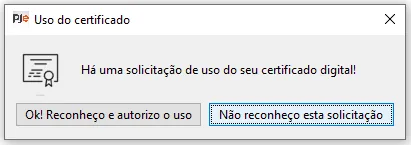
Before approving a request, confirm that you just initiated it from the TRT15 PJe workflow, that the browser address is the official route you intended to use, and that the displayed certificate holder is expected. If the request appears when no PJe action is open, cancel it and investigate.
The confirmation dialog is a security boundary, not a substitute for portal verification. Keep the private key, token PIN, and certificate file under your control. If you are working on a managed computer, follow the organization's certificate policy and ask IT to validate a driver or middleware change.
The software and the court portal can change on different schedules.
This page checked the PJeOffice Pro documentation, six stable first-party installer destinations, and the TRT15 official root on August 11, 2026. The verified user-facing file version is 2.5.16u. The page does not claim that TRT15 publishes a separate binary or a permanently stable deep login URL.
For a later visit, compare the official PJeOffice guide for a changed version and use the TRT15 root for current access, notice, and support links. If only the court layer changed, do not replace a working local signer without evidence that the application is the failing component.
Use first-party pages for current files, court navigation, and support ownership.
Use one verified desktop package, one official court entry, and a staged certificate test.
The shortest safe path is to select the current PJeOffice Pro 2.5.16u file for your architecture, install it without keeping a conflicting old signer active, and confirm the certificate before opening TRT15. Then enter through the official TRT15 website and follow its current PJe navigation. This sequence makes the evidence useful: an app failure points to the workstation, a missing certificate points to the certificate chain, and a court-wide outage points to TRT15.
If you need a more general installation sequence, continue with the PJeOffice installation guide. For platform-specific choices, use the Windows, Mac, or Linux guide. Keep the original official download link and never send certificate secrets while asking for help.
Short answers for installer, access, certificate, and availability intent.
Use the common official PJeOffice Pro installer in the download grid and select Windows, macOS, or Linux by architecture. Use the official TRT15 website separately for the current court entry and support route.
This page found no verified TRT15-branded binary. Keep the original PJeOffice Pro 2.5.16u filename and do not treat a renamed mirror as an official court package.
The verified user-facing PJeOffice Pro files are version 2.5.16u, checked August 11, 2026. Choose the platform and architecture that match the computer and certificate middleware.
Confirm that PJeOffice is running, the certificate is visible, and the local browser connection works. If multiple users cannot reach the portal, check the official TRT15 notices before reinstalling.
Often the common desktop signer can support more than one PJe portal, but each court can have different access, account, certificate, and support rules. Follow the other court's official entry instructions.
No. Approve only a request you initiated from the expected official workflow and whose certificate identity you recognize. Cancel unexpected prompts and ask trusted IT or court support for help without sharing private credentials.