
Windows 64-bit
For most modern Windows PCs
Opens the official pje.jus.br download source
A practical TJPI guide for choosing the official PJeOffice Pro installer, configuring a local certificate, and opening the current PJe entry for Piauí. The court portal and the desktop signer are separate services.
Choose the official PJeOffice Pro fileThe useful answer combines a common desktop installer with a court-owned PJe entry point.
Searches such as PJeOffice TJPI, TJPI PJe, and PJe Piauí can describe different tasks. This page covers the local signer, the digital certificate path, and the official TJPI route without pretending to be the court or replacing its notices.
Use the official downloads page when the task is to obtain PJeOffice Pro. Use the official TJPI PJe directory when the task is to enter a case system, find a portal, or read court instructions. A court acronym does not determine whether the computer needs Windows 64-bit, Windows 32-bit, macOS Intel, Apple Silicon, or Linux.
If a certificate is missing, start with the certificate guide. If the local signer or a remote portal is unavailable, classify the failure in the availability guide before reinstalling a working application. Never send a certificate file, private key, password, or token PIN to a support contact.
These cards use the current first-party file destinations and the original filenames. Choose by operating system and processor, not by court acronym.
For most modern Windows PCs
Opens the official pje.jus.br download source
For older 32-bit Windows systems
Opens the official pje.jus.br download source
For M1, M2, M3, M4, and later chips
Opens the official pje.jus.br download source
For Mac computers with an Intel processor
Opens the official pje.jus.br download source
For most current Linux distributions
Opens the official pje.jus.br download source
For legacy 32-bit Linux systems
Opens the official pje.jus.br download source
The court page requests a certificate operation; PJeOffice performs the local signer step; the certificate provider supplies the credential.
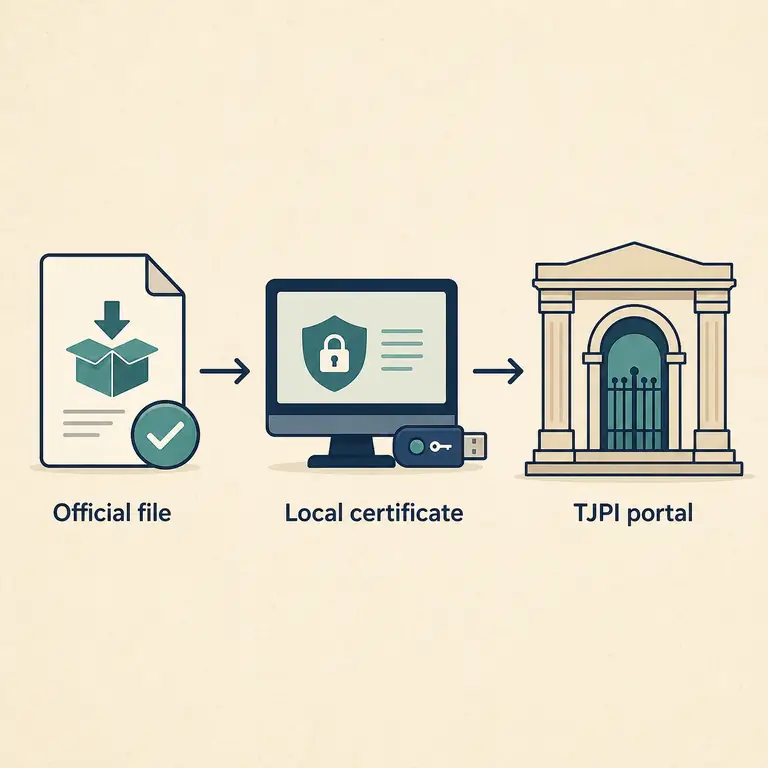
A typical request starts in the official TJPI browser route, reaches the local PJeOffice service, asks for a certificate action, and returns the result to the browser. The same generic error can therefore come from a stopped application, a missing driver, a browser connection, an invalid certificate, or a court-side service.
Keep the boundaries visible: the official PJeOffice guide is the first-party source for local certificate behavior, while TJPI owns its portal routes, notices, account rules, and support channels.
Use a small, reversible test sequence and stop when the failure belongs to another layer.
Select Windows 64-bit or 32-bit, macOS Apple Silicon or Intel, or the matching Linux ZIP from the official file matrix.
Exit an older signer or duplicate PJeOffice process before opening the browser test. Two local services make diagnosis unreliable.
Keep the original filename and follow your organization's antivirus, Gatekeeper, permissions, and managed-installation policy.
Use the TJPI PJe directory, confirm the expected certificate request, and stop if the page reports a remote service or account problem.
Naming the failed layer prevents an unnecessary downgrade or reinstall.
A correct PJeOffice file does not automatically install a token driver or authorize a TJPI account.
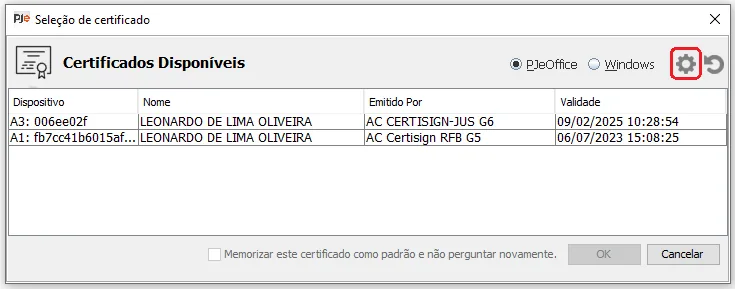
For A1, confirm the approved certificate file, password, validity, and local store. For A3, connect the token or reader, install the vendor middleware, and choose the compatible PKCS#11 library when required.
If the operating system sees the device but PJeOffice does not, check the driver, library path, and 32/64-bit compatibility before reinstalling the application. Use the certificate guide for a longer checklist and keep private credential material local.
The local certificate path can fail while the court website is working normally.
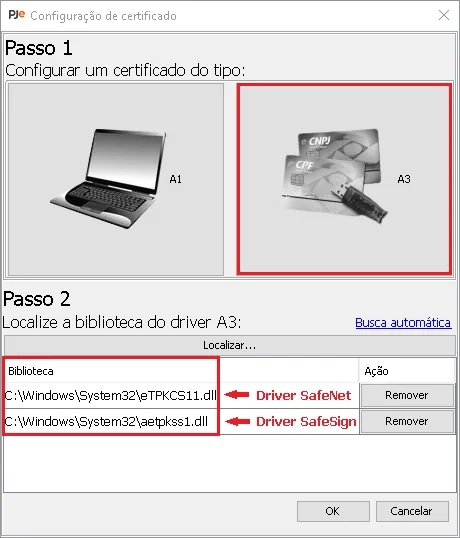
A3 devices often require vendor software, reader permissions, a driver, and a PKCS#11 library that matches the application path. Reload the certificate list after connecting a device or changing middleware.
Do not treat a blank certificate list as proof that the TJPI portal is down. Test the local signer first, then use the official TJPI route for court-side errors or account questions.
Classify the symptom before replacing a current official installer.
| Symptom | Likely layer | First check | Do not assume |
|---|---|---|---|
| PJeOffice is not running | Local application | Start the signer and check the local process. | The court portal can start a stopped desktop service. |
| The certificate list is empty | Certificate or driver | Separate A1 from A3; check device, middleware, driver, and PKCS#11. | The common installer repairs every token driver. |
| The browser cannot reach the signer | Local connection | Close duplicate processes, reload certificates, and retry the official route. | A TJPI outage explains every local connection error. |
| Several users cannot reach TJPI | Court-side service | Open the official TJPI PJe directory and current notices. | Reinstalling PJeOffice fixes a maintenance window. |
| The portal rejects a request | Account, permission, or certificate identity | Confirm the intended certificate and follow TJPI support guidance. | A local certificate test proves that a filing was accepted. |
The version label records a source check, not an invented release date or security guarantee.
The first-party PJeOffice Pro user guide linked the six user files using the 2.5.16u filename subtype. Each Windows, macOS, and Linux URL returned HTTP 200 from the real pje-office.pje.jus.br file host during this check. The page uses those stable destinations and records the check date instead of claiming a public release date.
If a future TJPI instruction names a minimum version, compare it with the current PJeOffice source and update the version, file size, compatibility note, FAQ, and download fields together. Do not guess a mirror or downgrade because an old tutorial mentions 1.0.26.
Use these sources for the installer, local certificate behavior, and court-owned entry points.
Short answers for download, installation, certificate, and Piauí court-access intent.
Use the official PJeOffice Pro file that matches the computer architecture, then use the TJPI PJe directory separately for the court portal.
No separate TJPI-branded binary was verified in the checked first-party sources. The common PJeOffice Pro 2.5.16u files are selected by platform.
Choose Apple Silicon for M-series Macs and Intel for Intel Macs. TJPI does not determine the Mac processor choice.
Confirm that the local signer is running and the certificate is visible, then check the official TJPI page for a remote portal or court-service issue.
No. Keep the certificate file, private key, password, and token PIN private; share only non-sensitive device and error details.