Windows 64-bit
For most modern Windows PCs
Opens the official pje.jus.br download source
Use this PJeOffice TJBA download guide to choose the common official PJeOffice Pro 2.5.16u installer, open the official TJBA PJe entry point, and separate local certificate errors from court-side problems.
Choose a downloadA court-specific search can combine a common desktop signer with a court-owned portal.
This page helps you choose the PJeOffice Pro file, reach the official TJBA PJe information page, configure a certificate, and identify which component owns an error. It cannot change a TJBA account, court permission, maintenance window, filing deadline, or remote service state.
Keep the installer, court portal, and support channel separate. If a local certificate test works but several users cannot reach the same TJBA service, stop reinstalling the desktop application and check the court's official notices instead.
TJBA users normally need the common official PJeOffice Pro installer, not a renamed TJBA binary.
For a PJeOffice TJBA download, start with the official PJeOffice Pro file that matches your operating system and processor architecture. The TJBA acronym identifies the court workflow and portal context; it does not by itself prove that a separate TJBA-branded installer exists. The six files in the official download matrix preserve the original filenames and first-party destinations.
After installing, open the current TJBA PJe information page from the TJBA official portal directory. Use the court's own link for the portal and support path rather than copying a login URL from an old tutorial. This keeps the local application task separate from the remote court service task.
A complete first test has four parts: PJeOffice Pro is running, the expected certificate is visible, the browser can request the local signer, and the certificate identity is the one you intended to use. If only the last portal step fails, compare the error with the PJeOffice unavailable guide before changing a working installation.
Users working on managed computers should also follow their organization's browser, network, token-driver, and certificate policies. Do not disable antivirus or operating-system protections globally, and never send a certificate file, private key, password, or token PIN to a support contact.
Use the verified common PJeOffice Pro 2.5.16u files and choose by architecture.
The current version checked for this page is PJeOffice Pro 2.5.16u. The official guide and six first-party file URLs were checked on August 7, 2026. The file responses returned the expected executable, DMG, or ZIP type and matched the sizes already shown in the site's common download data. The checked official sources did not publish a reliable public release date, so this page records the verification date instead of inventing one.
Do not downgrade just because an older TJBA or PJe tutorial mentions version 1.0.26 or another minimum. A statement such as “1.0.26 or higher” usually describes a floor for an older workflow. Compare the current court instruction with the current official PJeOffice Pro file before replacing a newer compatible build.
PJeOffice Pro includes its tested runtime and certificate workflow. Installing a separate Java runtime is not the normal answer to an A3 token, PKCS#11, browser-connection, or remote TJBA problem. Start with the component that actually failed.
Choose the file by operating system and processor. These cards use the verified first-party PJeOffice destinations.
For most modern Windows PCs
Opens the official pje.jus.br download source
For older 32-bit Windows systems
Opens the official pje.jus.br download source
For M1, M2, M3, M4, and later chips
Opens the official pje.jus.br download source
For Mac computers with an Intel processor
Opens the official pje.jus.br download source
For most current Linux distributions
Opens the official pje.jus.br download source
For legacy 32-bit Linux systems
Opens the official pje.jus.br download source
The fastest safe diagnosis starts by naming the layer that owns the next step.
The court portal and the desktop application cooperate, but they are not the same service.
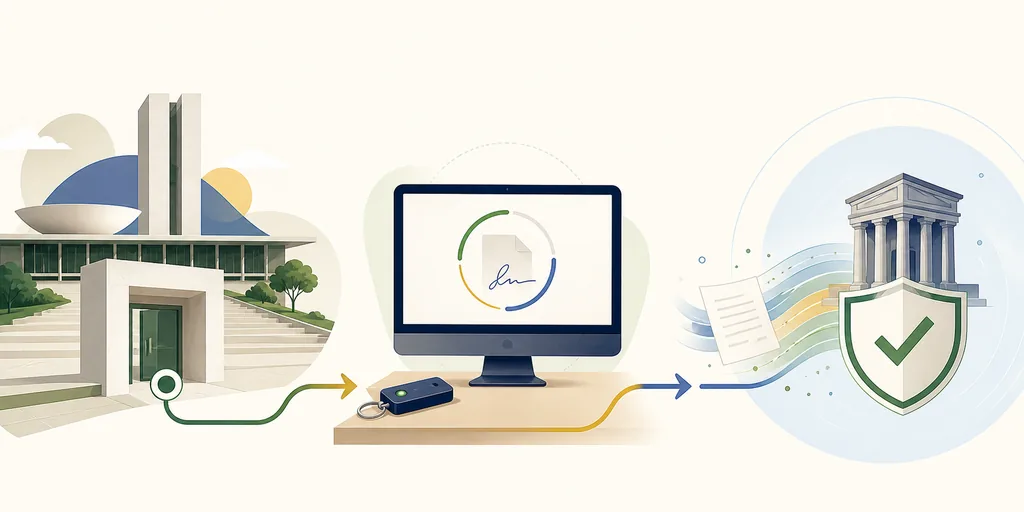
A typical request begins in the TJBA browser portal, reaches the local PJeOffice Pro service, asks for a certificate operation, and returns a signing result to the browser. A failure at one point can look like a generic “PJeOffice” problem even when the desktop application is healthy.
Use the diagram as a routing model, not as a promise that every TJBA screen has the same wording. The official TJBA directory is the source for current portal destinations; the official PJeOffice guide is the source for local certificate behavior.
This separation is also why the safest first step is a small local test: check the process, certificate list, and browser connection before making a change that could affect a real filing.
Use this order for a new installation or a controlled migration.
Select Windows 64-bit or 32-bit, macOS Apple Silicon or Intel, or the matching Linux ZIP. Do not choose by the court acronym; choose by the operating system and processor.
Exit an older PJe signer before launching PJeOffice Pro. Two local signer processes can make browser tests confusing and can leave the wrong certificate service listening.
Use the verified file card above and keep the original filename. Follow your workstation policy for antivirus, Gatekeeper, permissions, and managed installation controls.
For A1, select the approved certificate file and protect its password. For A3, connect the token or reader, install the vendor middleware, and select the compatible PKCS#11 library when required.
Open the current TJBA PJe page, make a low-risk local connection test, confirm the certificate identity, and stop if the request is unfamiliar or the portal is reporting a remote outage.
The certificate list is a local diagnostic surface, not proof that a court account is authorized.
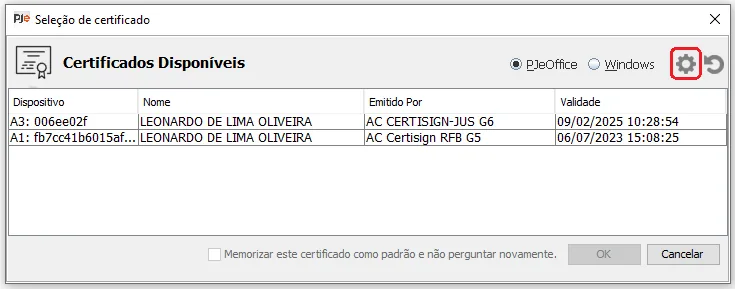
If PJeOffice opens but the expected certificate is missing, first determine whether it is an A1 file certificate or an A3 token/smart-card certificate. A1 depends on the approved file, password, validity, and operating-system certificate store. A3 depends on the physical device, reader, vendor middleware, driver, and the correct PKCS#11 library.
Reload the certificate list after connecting an A3 device or changing middleware. If the device is visible to the operating system but not to PJeOffice, check architecture compatibility and the vendor library path before reinstalling the whole application.
Never upload the certificate or private key to troubleshoot a missing entry. A support message can describe the product, operating system, token model, and non-sensitive error text without exposing credential material.
Classify the failure before changing a working installer.
| Symptom | Likely layer | First check | Do not assume |
|---|---|---|---|
| PJeOffice is not running | Local application | Start PJeOffice Pro and check whether the local service is listening. | A portal reinstall will not start a stopped local process. |
| Certificate list is empty | Certificate or driver | Separate A1 from A3 and check the token, middleware, driver, and PKCS#11 path. | The common installer can repair a missing token driver by itself. |
| Browser cannot reach the signer | Local connection | Close duplicate signer processes, reload the certificate list, and retry from the official portal. | A remote TJBA outage is the cause of every local connection error. |
| Several users cannot reach TJBA | Court-side service | Use the TJBA official PJe page and current notices. | Reinstalling PJeOffice will fix a remote maintenance window. |
| The portal rejects the request | Account, permission, or certificate identity | Confirm the intended certificate and account context, then follow the court's official support path. | A successful local certificate test proves that the filing was accepted. |
A correct PJeOffice version can still fail when the certificate middleware is wrong.
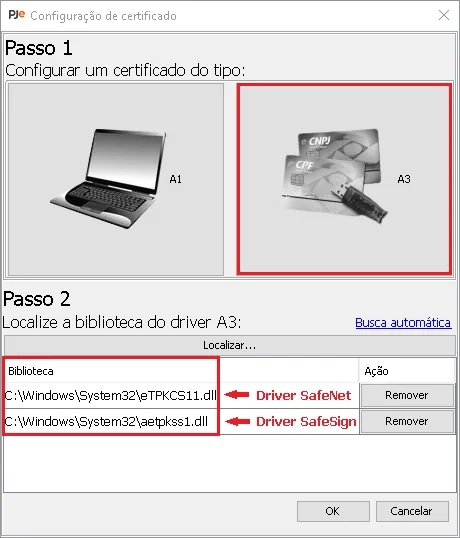
A3 devices are the most common reason that “the application is installed” and “the certificate is available” are treated as the same thing when they are not. The token may need a vendor driver, middleware, reader permission, or a PKCS#11 library that matches the application architecture.
On a 64-bit system, do not assume every vendor library is 64-bit. Follow the certificate authority or token vendor instructions, keep the library path stable, and test one change at a time. For A1, confirm the file certificate is valid and that the password belongs to the certificate you selected.
If you need a broader certificate checklist, use the site's certificate-not-recognized guide. Keep court-specific portal questions on the TJBA side and local device questions on the certificate side.
“Updated” should describe a verified source and matching file, not a decorative date.
On August 7, 2026, the six official PJeOffice Pro 2.5.16u files returned successful HTTP 206 range responses with the expected file types and total sizes. The page therefore keeps the common download data unchanged and points each CTA to the real first-party file URL.
If a future TJBA notice names a minimum version, compare it with the current PJeOffice Pro source and update the version, file size, compatibility note, FAQ, and installation explanation together. Do not replace a stable official URL with a guessed mirror or claim a security scan that was not performed.
A browser prompt is a permission boundary, not a reason to click through quickly.
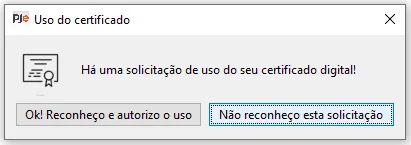
Before approving a certificate operation, check which page initiated the request, which certificate is selected, and whether the action matches what you intended to do. If a prompt appears while you are not signing or authenticating, cancel it and investigate the browser tab and local process.
This confirmation step does not prove that a court filing succeeded. It only confirms that the local signer received a request you recognized. Keep the certificate PIN private and follow the policy of your certificate provider or organization.
When a prompt repeats unexpectedly, close the portal tab, stop duplicate local signer processes if your policy allows it, and repeat a small test from the official TJBA route. Do not approve repeated unknown requests to make an error disappear.
Use these pages for the current installer, technical behavior, and court entry points.
Keep the court destination and local installer connected by evidence, not by a renamed file.
Choose PJeOffice Pro 2.5.16u from the official download matrix, select the architecture that matches the computer, and retain the original first-party filename. Then use the TJBA official PJe directory for the current court route and support information.
If the certificate is missing, follow the site's certificate troubleshooting guide. If the local signer or portal is unavailable, use the availability guide to separate a workstation problem from a TJBA service problem.
That sequence answers the core search intent without promising that a download can repair an account, authorize a filing, or restore a court service.
Short answers for download, installation, certificate, and court-access intent.
Use the official PJeOffice Pro file that matches your Windows, macOS, or Linux architecture. Use the TJBA official PJe page separately for the current court portal and support path.
No separate TJBA-branded binary was verified in the checked official sources. Start with the common PJeOffice Pro 2.5.16u installer and keep the TJBA portal link separate.
Choose macOS Apple Silicon for M-series Macs and macOS Intel for Intel processors. The court acronym does not determine the Mac architecture.
First confirm that PJeOffice Pro is running, the certificate is visible, and the browser can reach the local signer. Then check the official TJBA page for a court-side service or portal issue.
No. Keep the certificate file, private key, password, and token PIN private. Share only non-sensitive details such as the operating system, device type, and exact error wording.